Self-Serve Check-In for Fencing Clubs: Turn Any Tablet Into a Front-Desk Kiosk
FencR's new Check-In Kiosk turns any signed-in staff device into a locked, club-branded check-in station. Athletes and parents tap a name, confirm, and they are in. Every check-in lands straight in your existing attendance and analytics, with the true arrival time recorded. Free for every club.

Every fencing club has the same ritual: practice starts, a coach grabs the roster, and calls names over the sound of blades while half the room is still putting on shoes. Or worse, nobody takes attendance at all, and a month later you are guessing which beginners actually showed up enough to be worth a follow-up call.
FencR's new Check-In Kiosk removes the ritual. Any signed-in staff device, a tablet by the door, the front-desk laptop, the phone in your hand, becomes a locked, club-branded check-in station. Athletes walk in, tap their name, confirm, and they are checked in. Two taps, no app, no login, no line.
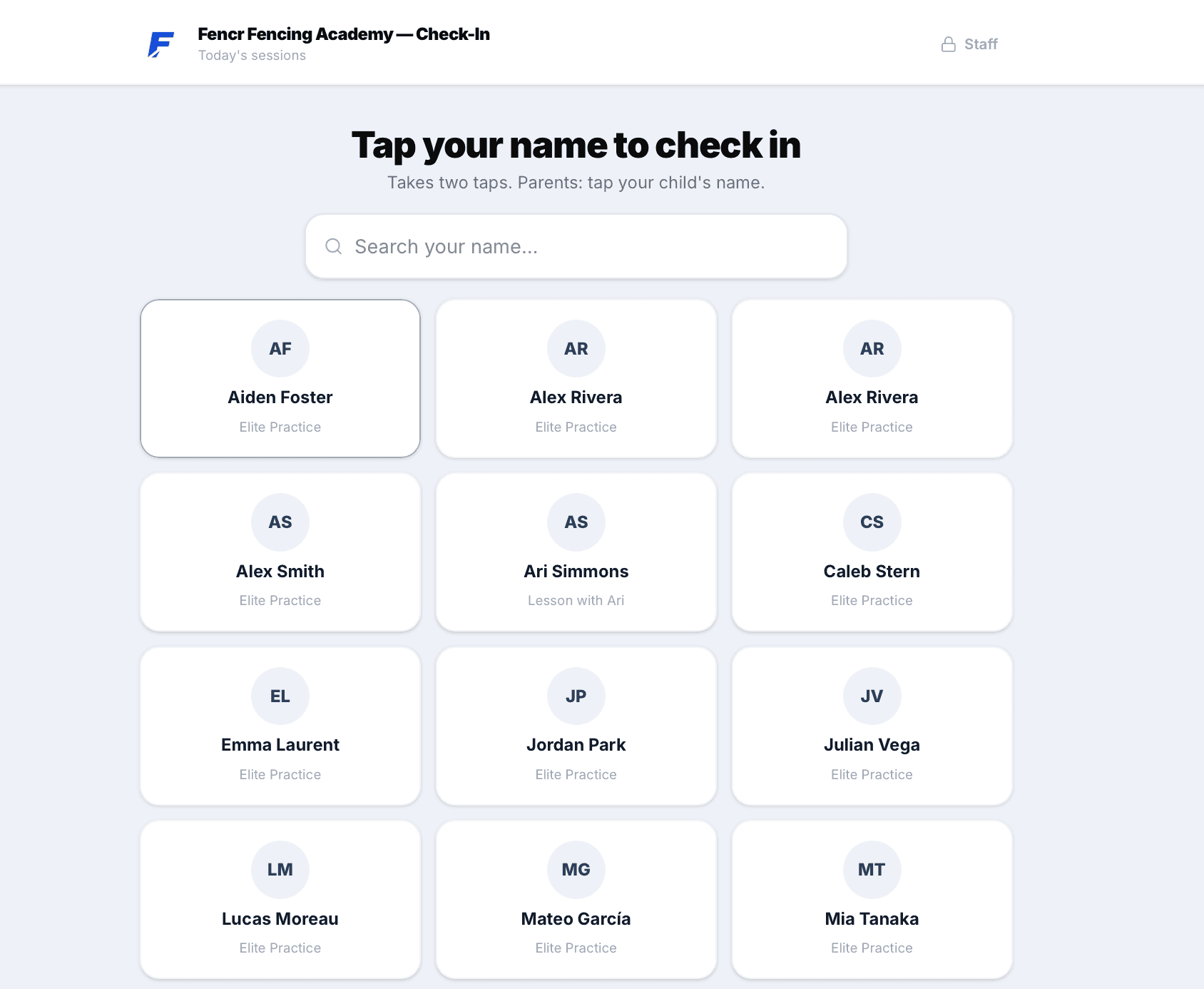
Two taps and you are in
The athlete side is deliberately tiny:
- Tap your name. The kiosk shows everyone booked today as a grid of name cards with a big search bar on top. Parents tap their child's name. Anyone who is already checked in shows a green check with their arrival time.
- Is this you? One confirmation screen with their name and today's session. If they are booked into more than one session today, all of them are listed and checked in together in the same tap.
- Done. A full-screen confirmation greets them by name, then the kiosk returns to the roster on its own, ready for the next person.
There is no practice picker, no scrolling through a calendar, and nothing to type except, at most, a few letters of your own name.
Arrivals count for the whole club day, so the athlete who shows up forty minutes early to stretch and the one who slides in after warm-ups both check in fine. FencR keeps the real arrival time on the record, which quietly builds you an honest picture of when people actually come through the door.
It feeds the attendance you already keep
The most important design decision in this feature is invisible: check-in is not a new attendance system.
A kiosk check-in marks the athlete as attended on the same booking record coaches already manage. That means:
- The coach's attendance view shows a Checked in chip with the arrival time, right where taken and missed marking already lives.
- Attendance analytics, participation charts, and lesson tracking pick up kiosk check-ins natively. There is no second ledger to reconcile and no export to merge.
- A coach can still mark anyone taken or missed manually. The kiosk is an extra pair of hands at the door, not a replacement for the coach's judgment.
If your club has never taken attendance consistently, this is the easiest possible way to start: put a tablet by the door and the data collects itself.
One kiosk for the desk, or one per session
The kiosk launches from wherever you already are on the Schedule page:
- Desk mode. The Check-In button in the Schedule header opens the kiosk across all of today's sessions. One device serves the whole evening: the 5pm youth class, the 6:30 competitive practice, and the private lessons in between, all on a single roster sorted by name.
- Single session. Opening a session's details shows an Open Check-In button that scopes the kiosk to just that class. This is the "coach props a tablet by the door before practice" flow.
- Lesson blocks. A block of private lessons gets the same treatment, scoped to that coach's students for the day, so lesson students check themselves in while the coach stays on the strip.
Locked, branded, and hard to break
A device you leave near the door has to survive curious kids and butterfingers:
- Starting the kiosk requires setting a 4-digit staff unlock code. The kiosk takes over the full screen, hides every piece of app navigation, and only the code gets you back to the dashboard.
- An accidental page refresh does not end check-in; the kiosk restores itself and keeps going.
- Flaky gym wifi gets honest handling: if a check-in does not reach the server, the athlete sees a clear try-again state, never a fake success.
- The whole screen carries your club's name and logo, so it reads as your front desk, not a third-party app.
A web page can never fully lock down a device, so for a truly unattended station we recommend pairing the kiosk with your tablet's built-in kiosk or guided-access mode. And one thing the kiosk deliberately does not do: walk-ins cannot book themselves in from it. Booking touches plan credits and capacity, which belong with your staff, so the kiosk points newcomers to a coach instead.
Free, like everything else on FencR
The Check-In Kiosk is included for every club. FencR has no tiers, no per-feature pricing, and no member caps, so a two-coach salle and a two-hundred-member academy get exactly the same front desk.
If your club is already on FencR, the Check-In button is waiting in your Schedule header today. If it is not, creating a club takes about fifteen minutes, and attendance is one more thing you will never chase on paper again.